Screen vs Monitor vs Display: Meaning, Differences & Examples
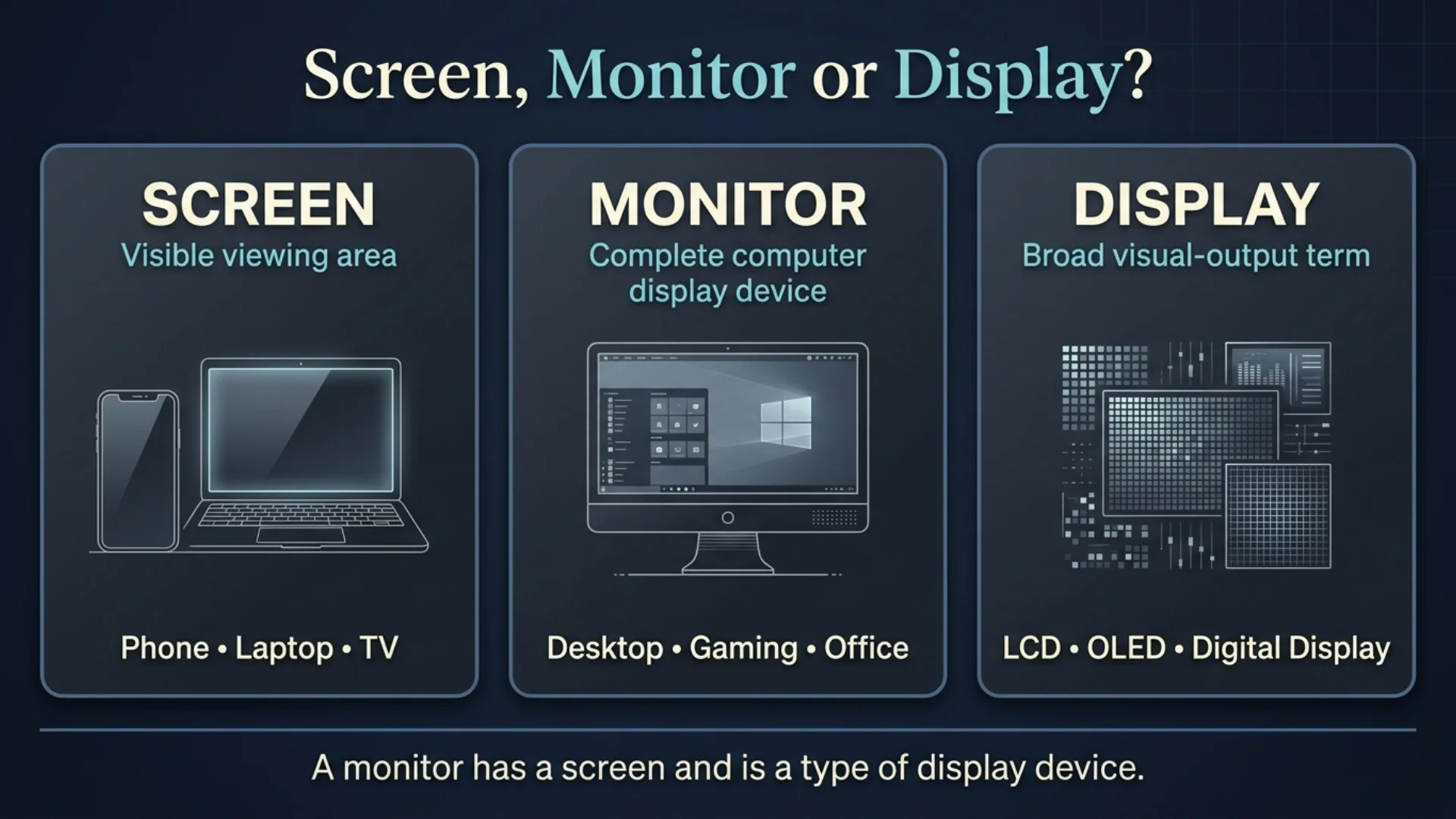
Quick Answer: A screen is usually the visible area you look at, a monitor is typically a complete standalone display device used with a computer, and display is the broadest technical term for hardware or a system that presents visual information.
A simple way to remember the difference is:
Screen = what you look at
Monitor = the complete computer-display device
Display = the broad technical term
For example:
“My phone screen is cracked.”
“I bought a second monitor for my PC.”
“This laptop has a 120 Hz OLED display.”
These terms overlap in everyday English, so one object can sometimes be described with more than one of them.

Screen vs Monitor vs Display at a Glance
| Term | Basic Meaning | Typical Context | Standalone Device? | Example |
|---|---|---|---|---|
| Screen | Visible viewing area or surface | Phones, laptops, TVs, monitors | Not necessarily | My phone screen cracked. |
| Monitor | Complete display device, usually for computers | PCs, gaming, offices | Usually | I bought a 27-inch monitor. |
| Display | Broad term for visual-output hardware/system | Technical specs, electronics | Not necessarily | The phone has an OLED display. |
The boundaries are not absolute.
People commonly say:
computer screen
and:
computer monitor
for the same physical product.
Likewise:
laptop screen
and:
laptop display
may both refer to the built-in visual component.
The difference is mainly one of scope and context, not three rigidly separate categories.
What Is a Screen?
A screen is usually the visible area where images, text, video, menus, or graphics appear.
You can have a:
- phone screen
- tablet screen
- laptop screen
- television screen
- monitor screen
- smartwatch screen
- cinema screen
The word is extremely common in everyday conversation.
Examples:
My phone screen is cracked.
The laptop screen is too bright.
Move the window to the second screen.
The TV has a huge screen.
When people say screen, they usually focus on the area they are looking at rather than the entire electronic device.
Can “Screen” Mean the Whole Device?
Sometimes.
Everyday English is not an engineering manual written by robots who become distressed when a noun overlaps with another noun.
Someone may say:
I need a bigger screen for my computer.
They probably mean:
I need a bigger monitor.
Likewise:
I connected another screen to my laptop.
may mean that another external monitor was connected.
So screen can be used loosely for the entire viewing device even though it often refers more specifically to the visible area.
What Is a Monitor?
A monitor is usually a complete electronic display device designed to show visual output from a computer or another source device.
A typical desktop monitor contains more than the part you physically look at.
It may include:
- LCD or OLED panel
- backlight, if required by the panel technology
- display controller
- power electronics
- HDMI ports
- DisplayPort
- USB-C
- speakers
- buttons or joystick controls
- casing
- stand or mounting hardware
So:
The monitor has a 27-inch screen.
is a perfectly logical sentence.
Monitor refers to the complete product.
Screen refers to the viewing area.
What Is a Monitor in a Computer?
A computer monitor is an output device that receives visual information from a computer and presents it to the user.
For example, a desktop PC may send its graphical output through:
- HDMI
- DisplayPort
- USB-C
- Thunderbolt
- older interfaces such as DVI or VGA
The monitor converts that input into visible text, images, video, software interfaces, games, and other graphics.
A monitor does not normally perform the full computing work itself.
The computer produces the content.
The monitor presents it.
Smart monitors complicate this slightly because some contain operating systems and streaming apps, but they can still function as ordinary external computer monitors.
What Is a Display?
Display is the broadest of the three terms.
As a noun, it can describe:
- a visual-output component
- a panel
- an electronic display device
- a system that shows information
- the information being presented
Examples:
The phone has an OLED display.
The laptop display supports a 120 Hz refresh rate.
The dashboard display shows the vehicle’s speed.
The external display is connected through USB-C.
Technical specifications frequently use display because the term works across many types of electronics.
Display Meaning
In technology, display commonly means a component or device that visually presents information.
But display is also a verb.
Example:
The monitor displays the image.
Here:
monitor = noun
displays = verb
Another example:
The screen displays an error message.
So the word can refer to either the visual hardware or the action of showing something.
Screen vs Monitor
The simplest distinction is:
Screen = viewing area
Monitor = complete display device
For example:
The monitor has a scratched screen.
The monitor itself may still include:
- casing
- inputs
- controls
- stand
- electronics
while the screen is the visible front area.
When to Say Screen
Use screen naturally when talking about:
- phones
- tablets
- laptops
- TVs
- visible damage
- brightness
- what appears in front of you
Examples:
My laptop screen is dirty.
The screen went black.
Look at the screen.
When to Say Monitor
Use monitor when talking about:
- desktop computer hardware
- external PC displays
- gaming setups
- dual-monitor setups
- monitor specifications
- monitor inputs
- desk equipment
Examples:
I bought a new gaming monitor.
My second monitor isn’t detected.
This monitor has two HDMI ports.
Is a Monitor a Screen?
Yes, in normal usage.
A monitor contains a screen and is frequently referred to simply as a screen.
But not every screen is normally called a monitor.
For example:
A smartphone has a screen.
You would not normally call the smartphone itself a monitor.
A television has a screen.
It can sometimes function as a computer monitor, but TV remains the more natural name for the device.
Screen vs Display
Screen and display overlap considerably.
Consider:
My phone screen is bright.
and:
My phone display is bright.
Both are natural.
However, the tone differs slightly.
Screen
Usually more conversational and physical.
Examples:
The screen is cracked.
Clean the screen.
Look at the screen.
Display
Often more technical or specification-focused.
Examples:
The phone uses an OLED display.
The display supports HDR.
The display has a 120 Hz refresh rate.
So:
screen often emphasizes what the user sees and touches.
display often emphasizes the visual component or technology.
Monitor vs Display
A monitor is a type of display device, while display is a broader term.
For example:
- a desktop monitor is a display
- a laptop has a display
- a phone has a display
- a smartwatch has a display
- a digital dashboard has a display
But we normally reserve monitor for dedicated visual devices, particularly those connected to computers.
Therefore:
Every monitor is a display device.
But:
Not every display is normally called a monitor.
Can Monitor and Display Mean the Same Thing?
Yes.
Manufacturers and technical writers sometimes use:
monitor
and:
display
almost interchangeably for standalone computer displays.
You might see:
27-inch monitor
or:
27-inch display
Both can describe essentially the same product.
The context usually tells you what is meant.
Technical terminology is useful, but ordinary English stubbornly refuses to become a perfectly normalized database.
Monitor Screen: Is the Phrase Correct?
Yes.
Monitor screen is understandable and useful when you need to distinguish the viewing area from the whole monitor.
Example:
There is a scratch on the monitor screen.
Compare:
The monitor stand is broken.
The first problem affects the screen.
The second affects another part of the monitor.
Screen Monitor: Is That Correct?
People may search for or casually say screen monitor, but monitor or computer monitor is usually more natural.
Instead of:
I need a screen monitor.
write:
I need a computer monitor.
or:
I need an external display.
Monitor or Moniter?
The correct spelling is:
monitor ✅
Not:
moniter ❌
Example:
I connected a new monitor to my laptop.
The spelling moniter is a common typo, not a separate technology term.
Screen vs Display Replacement
This phrase commonly appears when someone is repairing a phone, tablet, or laptop.
The difficulty is that repair companies do not always use screen and display consistently.
Screen Replacement
A shop advertising screen replacement may mean replacement of the complete front display assembly.
Depending on the device, that assembly can include:
- protective glass
- touchscreen digitizer
- LCD or OLED panel
- attached flex cables
- frame components
Display Replacement
Display replacement usually refers more specifically to replacing the component that produces the image.
On a laptop, that may mean replacing the LCD or OLED panel.
On a smartphone, it may mean the whole bonded screen assembly.
Glass-Only Replacement
If only the outer glass is cracked while:
- the image remains perfect
- touch still works
- there are no black spots or lines
some specialist repair services may offer glass-only refurbishment.
That is different from replacing the complete display assembly.
Important Rule
Before buying a replacement part, check exactly what the seller means by:
screen
display
LCD
OLED
digitizer
assembly
Two listings can use different words for the same part, because apparently electronics repair terminology also enjoys making humans read the fine print.
Laptop Screen vs Monitor
A laptop normally has a built-in screen or display.
A monitor normally refers to a separate external device.
Example:
My laptop has a 14-inch display and I connected a 27-inch monitor.
That sentence clearly distinguishes the two.
Can a Laptop Display Be Used as a Monitor?
Usually not directly through the laptop’s HDMI port.
On most laptops, HDMI and DisplayPort-capable USB-C connections are designed primarily to send video out, not receive video from another computer.
So connecting:
desktop HDMI output → laptop HDMI port
usually does not turn the laptop into a monitor.
Possible Alternatives
You may be able to use a laptop as a secondary display through:
- wireless display software
- remote-desktop software
- screen-sharing applications
- a video capture device
- specific hardware designed with video input
Some specialized devices may support input, but you should not assume an ordinary laptop HDMI port does.
Can I Connect a Monitor to My Laptop and Use Both Screens?
Yes.
This is extremely common.
You can usually keep the laptop’s built-in display active while using an external monitor.
The setup becomes:
Laptop display + external monitor
Your operating system can usually:
- duplicate the image
- extend the desktop
- make either screen primary
- arrange screens left/right
- use different resolutions where supported
For productivity, Extend is usually the most useful mode because each screen provides separate desktop space.
Screen vs Monitor vs Display by Device
| Device | Most Natural Term | Other Valid Term |
|---|---|---|
| Smartphone | screen | display |
| Tablet | screen | display |
| Laptop | screen/display | built-in display |
| Desktop PC setup | monitor | screen/display |
| Television | TV/screen | display |
| Smartwatch | screen/display | display |
| Digital sign | display | screen |
| Gaming setup | monitor | screen/display |
| Projector setup | screen | display system |
TV vs Monitor
A television and a computer monitor can both display video from a computer, but they are designed around different priorities.
Monitor
Usually prioritizes:
- close viewing distance
- sharp text
- computer connectivity
- low input latency
- high refresh rates on gaming models
- desk ergonomics
- DisplayPort support
- high pixel density at smaller sizes
TV
Usually prioritizes:
- larger screen sizes
- living-room viewing distance
- television and streaming content
- image processing
- built-in smart apps
- speakers
- remote controls
- HDMI connectivity
- cinematic viewing
Modern TVs can blur this distinction considerably, especially high-refresh OLED models.
Can I Use a TV Screen as a Monitor?
Yes.
If your computer and TV share a compatible connection such as HDMI, a TV can usually display the computer’s output.
However, check:
- resolution
- refresh rate
- input lag
- text clarity
- chroma handling
- viewing distance
- available inputs
- PC/Game mode
- scaling
- overscan settings
A TV that looks superb from ten feet away may feel awkward two feet from your face.
Physics remains annoyingly resistant to marketing.
Monitor vs TV for Office Work
For desk-based productivity, a monitor is usually easier to recommend because monitors are designed for close viewing.
Advantages can include:
- sharper text at desk distance
- ergonomic stands
- DisplayPort or USB-C
- easier multi-monitor setups
- less aggressive image processing
- more practical 24–32 inch sizes
A television may still work well when you need an unusually large workspace or sit farther away.
Monitor vs TV for Gaming
Either can be excellent.
A gaming monitor may provide:
- very high refresh rates
- DisplayPort
- low latency
- desk-friendly size
- variable refresh rate
- fast response times
A modern gaming TV may provide:
- huge image
- OLED contrast
- 4K resolution
- 120 Hz or higher refresh on capable models
- HDMI 2.1 features
- excellent console compatibility
The better choice depends on:
- desk vs couch
- PC vs console
- screen size
- resolution
- refresh rate
- budget
Can I Use a 65-Inch TV as a Computer Monitor?
Yes, technically.
Whether you should depends mostly on distance and use.
A 65-inch TV can work well for:
- couch gaming
- simulators
- presentations
- media
- living-room PCs
- large dashboards
It is much less practical on a normal desk because you may need to move your head and eyes constantly to see the whole screen.
At the same resolution, spreading the image over a much larger physical area also reduces pixel density, so text may not look as crisp from close range as it does on a smaller monitor.
For a 65-inch TV, sitting farther back usually makes more sense.
Do I Need a TV or Just a Monitor?
Choose a monitor if your main use is:
- computer work
- coding
- spreadsheets
- web browsing
- competitive PC gaming
- design
- multi-monitor productivity
Choose a TV if your main use is:
- movies
- streaming
- console gaming from a couch
- traditional television
- large-room viewing
- family entertainment
Choose based on use, not the label printed on the box.
Can I Watch Netflix on a Computer Monitor?
Yes.
A normal monitor can show Netflix when connected to a device that runs Netflix, such as:
- desktop PC
- laptop
- streaming stick
- compatible game console
- media player
You also need a way to hear audio.
That may be:
- monitor speakers
- headphones
- external speakers
- speakers connected to the source device
Some smart monitors can run streaming apps without a separate computer.
A standard monitor generally cannot run Netflix by itself unless it includes smart-platform functionality.
What Are the Three Types of Monitors?
This question has two common interpretations.
Three Common LCD Panel Types
For modern LCD monitors, the three classic panel families are:
IPS
VA
TN
IPS
Known for:
- strong viewing angles
- good color performance
- wide availability
- strong all-purpose use
VA
Known for:
- higher native contrast than typical IPS
- deeper blacks
- good multimedia performance
TN
Known historically for:
- fast response
- low cost
- competitive gaming use
Its viewing angles and color quality are generally weaker than modern IPS alternatives.
What About OLED?
OLED is another major modern monitor technology and is not an IPS, VA, or TN LCD subtype.
OLED offers:
- self-emissive pixels
- perfect or near-perfect blacks
- extremely fast pixel response
- strong HDR potential
but may cost more and can carry burn-in considerations depending on use.
Historical Technology Categories
If a school question asks for three monitor technologies rather than LCD panel types, you may encounter:
- CRT
- LCD/LED-backlit LCD
- OLED
So the intended answer depends on what the question means by type.
LCD vs LED Monitor: Are They Different?
Most products marketed as LED monitors are actually:
LCD panels with LED backlighting
They are not normally a completely separate alternative to LCD.
Older LCDs often used CCFL backlights.
Modern LCD monitors usually use LEDs for backlighting.
So:
LED monitor
often means:
LED-backlit LCD monitor
What Is OLED?
OLED stands for organic light-emitting diode.
Unlike standard LCDs, OLED pixels generate their own light.
That allows:
- very deep blacks
- high contrast
- rapid pixel response
- thin panel designs
OLED increasingly appears in:
- phones
- TVs
- laptops
- gaming monitors
- professional displays
What Is a Display Panel?
The panel is the image-producing component inside a display device.
For example, a monitor may contain:
- IPS LCD panel
- VA LCD panel
- TN LCD panel
- OLED panel
The monitor includes the panel plus the supporting hardware around it.
That is another reason:
panel
screen
display
and:
monitor
should not always be treated as exact synonyms.
Resolution vs Screen Size
These are different specifications.
Screen Size
Usually measured diagonally in inches.
Examples:
- 24-inch
- 27-inch
- 32-inch
- 34-inch
Resolution
The number of pixels used to create the image.
Common examples include:
- 1920 × 1080
- 2560 × 1440
- 3840 × 2160
A larger screen does not automatically mean a sharper image.
Resolution and physical size work together to determine how densely pixels are packed.
Refresh Rate
Refresh rate describes how often a display refreshes its image each second.
It is measured in hertz.
Examples:
- 60 Hz
- 75 Hz
- 120 Hz
- 144 Hz
- 165 Hz
- 240 Hz
Higher refresh rates can make:
- motion
- scrolling
- gaming
- cursor movement
look smoother when the source device can provide enough frames.
Response Time vs Refresh Rate
These are not the same specification.
Refresh rate measures how frequently the display updates.
Response time describes how quickly pixels transition between states.
Both can affect perceived motion clarity.
Gaming monitor advertising has spent years ensuring consumers get to memorize several numbers before they are allowed to enjoy a video game.
What Does Display Resolution Mean?
Display resolution describes the pixel dimensions used to create the image.
For example:
1920 × 1080
means the image grid contains 1,920 pixels horizontally and 1,080 vertically.
According to TechTarget, pixels are the basic programmable units used to form images on digital displays, and resolution figures describe how many pixels make up that image.
What Is an On-Screen Display?
An on-screen display, often shortened to OSD, is the menu or information layer that appears over the image on a monitor, TV, or other electronic display.
It may let you adjust:
- brightness
- contrast
- color
- picture modes
- input selection
- gaming settings
For a technical definition, see TechTarget’s explanation of on-screen displays.
That is different from display meaning the physical visual hardware.
HDMI vs DisplayPort for a Monitor
Both can carry digital video and, in many cases, audio.
HDMI
Common on:
- TVs
- monitors
- consoles
- laptops
- streaming devices
DisplayPort
Especially common on:
- desktop graphics cards
- computer monitors
- high-refresh PC setups
Neither connector automatically guarantees better picture quality.
The supported versions, resolution, refresh rate, bandwidth, and device capabilities matter.
How Much Should a Decent Monitor Cost?
Prices change rapidly, particularly during sales.
As of October 2026, current U.S. deals show basic 24-inch monitors dipping below $100, while capable 27-inch 1440p models commonly appear around the mid-$100s to mid-$200s. 4K models can start around the mid-$200 range during promotions, while premium OLED, ultrawide, and specialist professional displays cost much more.
A practical rough guide is:
| Use | Typical Budget |
|---|---|
| Basic office/study | $80–$150 |
| Better office / 1440p | $150–$300 |
| Gaming | $150–$500+ |
| 4K productivity | $250–$600+ |
| OLED / premium gaming | $300–$1,000+ |
| Professional color work | Can exceed $1,000 |
Do not buy based on price alone.
Check:
- resolution
- panel type
- refresh rate
- color accuracy
- ports
- stand adjustment
- warranty
- your actual use
A cheap monitor that hurts your neck for eight hours per day is an impressively expensive way to save $40.
Screen, Monitor, or Display: Which Word Should You Use?
Talking About a Phone
Use:
screen
or:
display
Example:
My phone screen is cracked.
Talking About a Desktop Computer
Use:
monitor
Example:
I bought a second monitor.
Talking About Specifications
Use:
display
Example:
The laptop has a 14-inch OLED display.
Talking About Physical Damage
Use:
screen
Example:
The screen has a scratch.
Talking About Display Technology
Use:
display
Example:
The device uses an OLED display.
Talking About the Complete External Product
Use:
monitor
Example:
The monitor has HDMI and DisplayPort inputs.
Are Screen, Monitor, and Display Synonyms?
They can overlap, but they are not perfect synonyms.
Consider:
The monitor has a cracked screen.
Here, they clearly describe different scopes.
But:
Connect a second display.
and:
Connect a second monitor.
may describe exactly the same external device.
Context determines how much distinction matters.
Common Mistakes
Mistake 1: Saying Every Screen Is a Monitor
A phone screen is not normally called a monitor.
Mistake 2: Treating Display as Only a Technology
Display can describe technology, a component, a complete external device, or visual output depending on context.
Mistake 3: Assuming a Laptop HDMI Port Accepts Video Input
Most laptop HDMI ports are outputs.
Mistake 4: Assuming LED and LCD Are Opposites
Most modern LED monitors are LED-backlit LCDs.
Mistake 5: Assuming a TV Cannot Be a Monitor
A compatible TV can display computer output.
The real question is whether it suits your distance, text work, latency, refresh-rate, and size requirements.
Mistake 6: Writing “Moniter”
The correct spelling is:
monitor
Easy Trick to Remember
Use this three-part shortcut:
SCREEN = surface
MONITOR = machine
DISPLAY = broad technical term
Not perfect in every sentence, but extremely useful.
Another example:
A monitor contains a display panel and gives you a screen to look at.
That sentence captures the relationship neatly.
More Word-Difference Guides
English and technical vocabulary often contain terms that overlap without being exact synonyms. The same sort of distinction appears in GrammarRead’s Concurrent vs Simultaneous guide, while Assume vs Presume vs Infer shows how context changes the best word choice. For another three-way comparison, see Violet vs Indigo vs Purple.
Frequently Asked Questions
What is the difference between a monitor and a display screen?
A monitor is usually a complete standalone electronic device, especially one used with a computer. The screen is the visible area you look at, while display is a broader term that can refer to the panel, hardware, or visual-output system.
Can I use a TV screen as a monitor?
Yes. A TV with a compatible input such as HDMI can usually display computer output. For close desk use, check text clarity, resolution, input lag, refresh rate, PC mode, and viewing distance.
What are the three types of monitors?
If you mean common LCD panel types, the traditional three are IPS, VA, and TN. If you mean broad display technologies, you may instead see categories such as CRT, LCD/LED-backlit LCD, and OLED.
Can a laptop display be used as a monitor?
Usually not through the laptop’s HDMI port because most laptop HDMI ports are outputs rather than inputs. You can sometimes use wireless display software, remote desktop, a capture device, or specialized hardware.
Can I hook up a monitor to my laptop and use both screens?
Yes. Most operating systems allow you to extend the desktop across the laptop display and an external monitor, giving you two independent workspaces.
Do I need a TV or just a monitor?
Choose a monitor mainly for desk work, PC gaming, coding, design, and close viewing. Choose a TV mainly for movies, streaming, console gaming, couch viewing, and large-room use.
Can I use a 65-inch TV as a computer monitor?
Yes, but it works best from a greater viewing distance. A 65-inch TV can be excellent for couch gaming, presentations, simulators, and media, but may be overwhelming on a normal desk.
How much should a decent monitor cost?
In the 2026 U.S. market, decent everyday monitors can often be found around $80–$150, while better 1440p, gaming, and 4K options generally move into the $150–$600+ range. Premium OLED and professional monitors can cost substantially more.
Can I watch Netflix on a computer monitor?
Yes. Connect the monitor to a computer, streaming stick, console, or another device capable of running Netflix. You also need speakers or headphones unless the monitor has built-in audio. Some smart monitors can run Netflix directly.
Is a screen the same as a display?
Often, especially in casual language. Screen usually emphasizes the visible viewing area, while display is broader and more common in technical descriptions.
Is a monitor the same as a display?
A monitor is a type of display device. Display is broader and can also refer to a phone panel, laptop panel, smartwatch display, dashboard, or other visual-output hardware.
Is “moniter” a word?
Not for computer hardware. The correct spelling is monitor.
What is a display screen?
A display screen is a visual surface or electronic panel that presents text, images, video, or graphical information.
What is a monitor screen?
A monitor screen is the visible display area of a computer monitor. The monitor itself also includes electronics, ports, casing, controls, and usually a stand or mount.
Final Answer
The Screen vs Monitor vs Display difference is mainly about scope.
Screen usually means the visible area you look at.
Monitor usually means a complete standalone computer display device.
Display is the broadest term and can describe a panel, visual-output component, technology, or complete display device depending on context.
So:
Your phone has a screen/display.
Your laptop has a built-in screen/display.
Your desktop usually connects to a monitor.
That monitor contains a display panel and has a screen you look at.
The terms overlap, so native speakers do not always preserve a strict distinction. For everyday conversation, context is usually enough. For technical writing, product specifications, repairs, and shopping, using the more precise term helps prevent confusion.